
Why this is the best free BLS tool in 2026
Search for a "free BLS tool" and you'll find a graveyard of YouTube videos with baked-in ads, ten-year-old Flash demos, and "free trials" that lock the useful settings behind a paywall. EMDR Assist is different: the full bilateral stimulation tool is free forever, with no signup required to start a session, no watermark on the stimulus, and no degraded "lite" mode.
Here's what makes it the most-recommended free BLS tool for EMDR therapists and self-practitioners:
- Every modality included — visual stimulus, alternating stereo audio tones, sound bowl, chimes, and ambient soundscapes. Most "free" tools give you one.
- Real telehealth support — generate a private client link in one click. No screen-share lag, no Zoom compression artifacts.
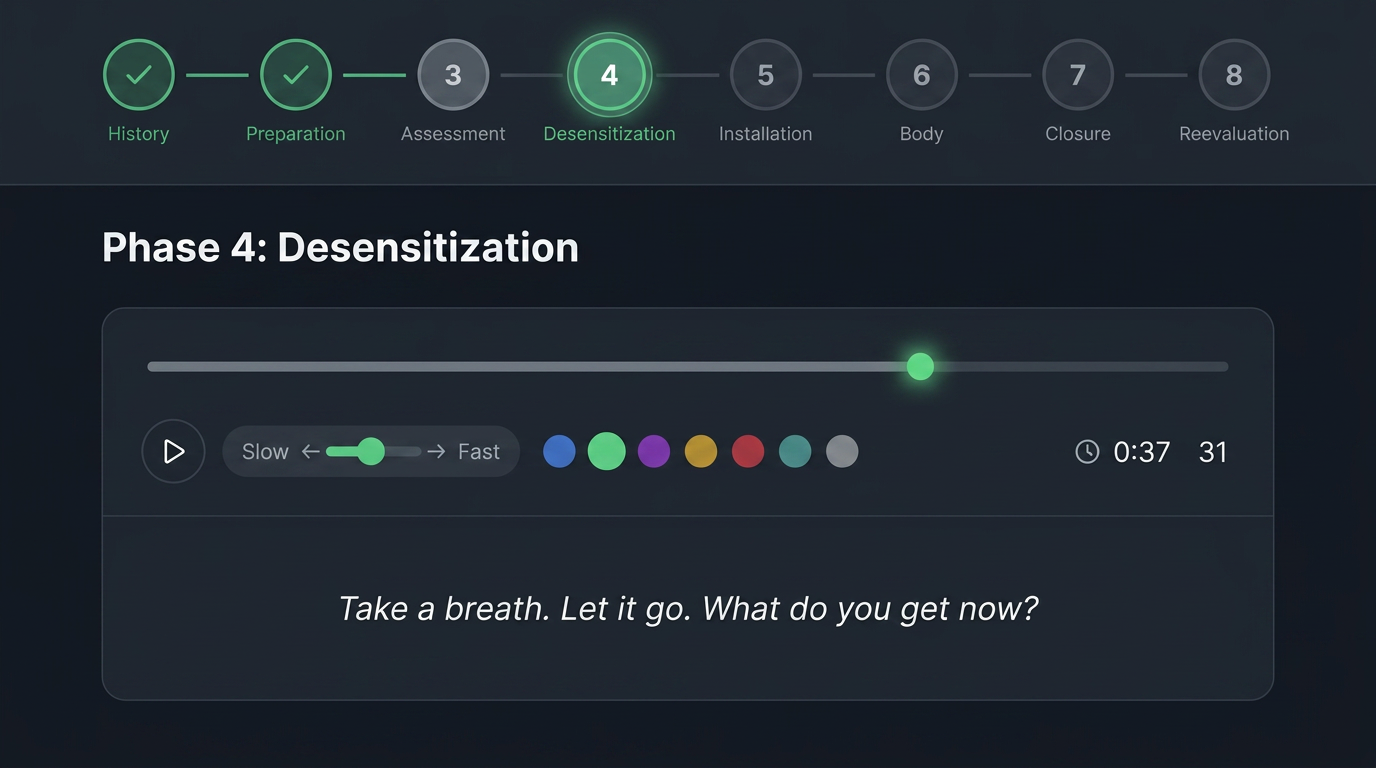
- Clinical-grade controls — fine-grained speed (glacial to rapid), 7 colors, 8 shapes, 4 movement patterns, custom session lengths.
- Privacy-first — runs in your browser, stores no client PII, no tracking inside the session.
- Built by EMDR clinicians — every default reflects how real sessions actually run.
Free BLS tool comparison
How EMDR Assist's free BLS compares to other commonly recommended free options:
| Feature | EMDR Assist | YouTube BLS videos | Basic web metronomes |
|---|---|---|---|
| Visual + audio combined | Yes | One or the other | Audio only |
| Sound bowl / ambient sounds | Yes | No | No |
| Adjustable speed mid-session | Yes, 11 presets | No | Limited |
| Telehealth client link | Yes | No | No |
| Ads / interruptions | Never | Yes | Sometimes |
| Breathing guide | Yes, 6 patterns | No | No |
| Signup required | No | No | Varies |
Why EMDR therapists need a dedicated BLS tool
Bilateral stimulation (BLS) is the engine of every EMDR session. Whether you use eye movements, alternating tones, or tactile taps, the quality and consistency of your BLS directly shapes how well your client can stay in their window of tolerance and reprocess targeted memories. For years, EMDR therapists have been stuck choosing between expensive light bars, awkward YouTube videos, or basic metronomes that weren't built for clinical use.
EMDR Assist's BLS tool was designed by clinicians who run EMDR every week. It runs in any modern browser — no installs, no equipment to ship, no per-client license. You can use it for in-person sessions on a laptop or tablet, or send a single link to your telehealth client so they see the moving stimulus on their own screen while you stay in full control from yours.
Two modalities in one tool: visual and audio cues
Different clients respond to different stimulation modalities, and many shift between modes during a single session. EMDR Assist supports both core on-screen modalities without needing to swap apps:
- Visual BLS — a smoothly moving target with adjustable color, size, shape, and trail. Includes high-contrast and low-stimulation options for clients with sensory sensitivity.
- Audio BLS — alternating left/right tones at a wide range of frequencies, with stereo balance preserved through headphones or spatial audio devices.
Both can be combined or used independently. Many therapists use audio with eyes closed for dissociative clients, or pair gentle visual movement with breath cues during preparation phase work.
Built for telehealth: the shareable client screen
Telehealth EMDR has been one of the hardest things to deliver well. Screen-sharing a metronome through Zoom introduces lag, audio compression, and dropped frames — all of which break the rhythmic precision BLS depends on. EMDR Assist solves this with a direct client link:
- You generate a private session link from the therapist view.
- Your client opens it on their own laptop, tablet, or phone — no account or app required.
- The stimulus runs natively on their device, perfectly synced with your controls.
- You stay in full control of speed, mode, start/stop, and set length from your screen.
This eliminates the screen-share lag that has plagued telehealth EMDR for years and gives your client a calm, full-screen experience without the chrome and chat panels of a video call.
Clinical controls that respect the protocol
Speed matters. EMDR research and Shapiro's standard protocol both emphasize that BLS speed should be calibrated to each client and adjusted based on observed processing. EMDR Assist gives you fine-grained control without forcing you to fumble during a session:
- Adjustable speed from slow installation pace to faster desensitization rhythms.
- Set counter with auto-stop at customizable set lengths (e.g., 24, 30, or 40 passes).
- Direction control — horizontal, diagonal, or curved paths to match clinical preference.
- Trail and color shift options for clients who report dissociation or under-arousal.
Every setting is one click away during a live session — no buried menus, no breaking eye contact with your client to find a button. For the faster, more variable BLS used in EMDR 2.0 — de Jongh & Matthijssen's working-memory-taxing variant of the standard protocol — the same speed and direction controls scale up without a separate tool.
Privacy-first by design
EMDR Assist stores no client PII. The BLS tool runs entirely in the browser, the client link is ephemeral and tied to the session you start, and nothing about your client's session is logged on our servers. This makes it appropriate for use in privacy-conscious practices when paired with a secure video platform of your choice.
The free BLS tool is part of a larger clinical session co-pilot that also includes an 8-phase protocol guide and SUD/VOC tracking with PDF session reports.
Frequently asked questions
What is the best free BLS tool for EMDR?
EMDR Assist is widely considered the best free bilateral stimulation tool for EMDR because it bundles visual stimulus, alternating audio tones, sound bowl and ambient sounds, a telehealth client link, breathing guides, and fine-grained clinical controls — with no signup, no install, and no paywalled features.
Is there a catch with the free BLS tool?
No. The bilateral stimulation tool is free forever with every modality unlocked. EMDR Assist also offers an optional paid clinician plan for session notes, phase tracking, and SUD/VOC logging, but the BLS tool itself is fully free and standalone.
Is the bilateral stimulation tool really free?
Yes — the core BLS tool is free forever, with no credit card required. Visual and audio modes are both included on the free plan, along with the shareable client screen for telehealth.
Does it work for telehealth EMDR sessions?
Yes. You generate a client link from the therapist view, your client opens it on their own device, and the stimulus runs natively on their screen — no screen-sharing lag.
What devices does the BLS tool work on?
Any modern browser on a laptop, tablet, or phone. Chrome, Safari, Firefox, and Edge are all supported. No app install required for therapists or clients.
Can I adjust the speed mid-session?
Yes — speed, color, size, direction, and modality can all be changed live without interrupting the session, and the changes sync instantly to the client's screen if you're using the shareable link.
Is this a secure tool?
EMDR Assist stores no client PII and the BLS sessions are ephemeral. When paired with a secure video platform, it can be used appropriately in privacy-conscious practices. Always confirm your full tech stack with your compliance officer.
Related tools for EMDR therapists
Step-by-step guides for all 8 phases of EMDR therapy.
Capture SUD and VOC scores during desensitization and installation.
How to run online EMDR — research, setup, BLS options, and client FAQs.
TheraTapper, NeuroTek, EMDR Kit, Bi-Tapp, and app-based tactile BLS compared.
What an EMDR app should actually do beyond bilateral stimulation.
The clinical toolkit therapists actually reach for, week to week.
Try EMDR Assist with your next session
14-day free trial. No credit card. Built by clinicians, for clinicians.